Configuring GitHub Webhooks
Spinnaker can be configured to listen to changes in GitHub repositories. Once configured, changes in a repository can trigger pipelines.
These steps show you how to configure webhook push events to send to Spinnaker from a single GitHub repository.
Prerequisites
-
You need Spinnaker’s API running on an endpoint that is publicly reachable. Ideally this means that you’ve configured authentication . This is required to allow GitHub’s webhooks to reach Spinnaker.
If you’re unsure of what your Spinnaker API endpoint is, check the value of
services.gate.baseUrlor your ingress or services. -
You need a GitHub repository to send Webhooks from.
Configuring your GitHub webhook
Under your GitHub repository, navigate to Settings > Webhooks > Add Webhook. Here, provide the following values to the form shown below:
| Field | Value |
|---|---|
| Payload URL | Given that the above
prerequisite
API endpoint is $ENDPOINT, enter $ENDPOINT/webhooks/git/github. While all GitHub webhooks share an endpoint in Spinnaker, there is no practical limit to the number of repositories you can configure to send notifications. |
| Content type | application/json |
| Secret | The value is up to you, and must be provided to any GitHub webhooks triggers that you configure within Spinnaker. It’s used to ensure that only GitHub can trigger your pipelines, not an imposter. |
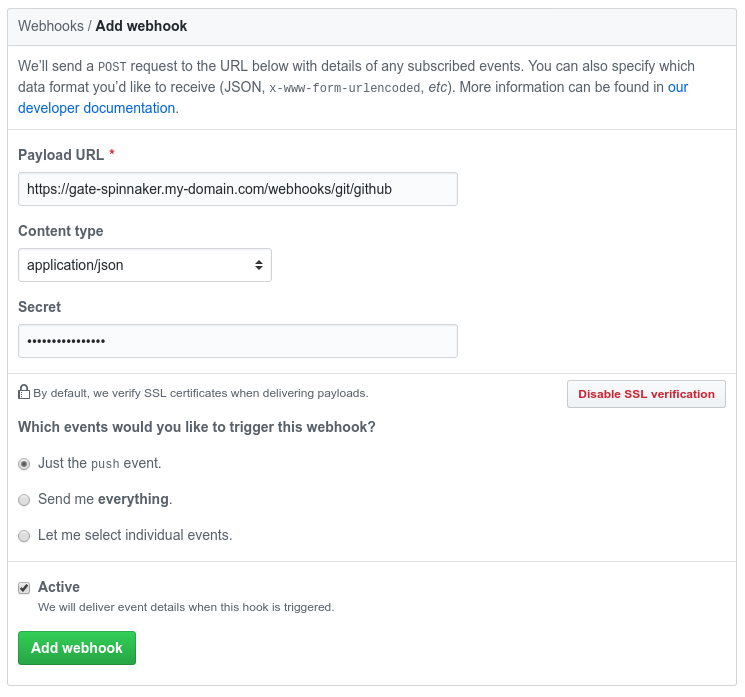
Spinnaker configuration
Aall that’s needed is pipeline trigger configuration. An example of that can be found in this guide .