Google Groups
Service account setup
In order to access a user’s group membership, we must use the Google Admin Directory API. We will setup a Google Cloud Platform (GCP) service account and grant it access to the Directory API.
-
Enable the Admin SDK here .
-
In your Cloud Console , create a service account that will access the G Suite Directory API.
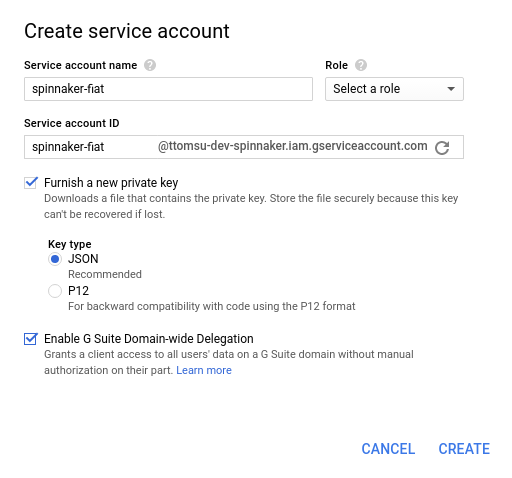
- Navigate to the “IAM & Admin” –> Service accounts section.
- Click “Create Service Account.”
- Give it a name like “spinnaker-fiat.”
- Select “Furnish a new private key” and select the JSON format.
- Select “Enable G Suite Domain-wide Delegation.”
- Click “Create”, which should download the private key for your new service account (see figure below).
- Transfer this JSON file to a known location in your Spinnaker deployment.
- You should see your newly created service account in the list, along with “DwD” and an option to “View Client ID”. Click “View Client ID” (see figure below).
- Note the Client ID displayed. It will be used in the next step.

-
Give your service account access to the G Suite Directory API in the G Suite Admin console .

- Navigate to the “Security” Settings page.
- Under “Advanced settings”, click “Manage API client access.”
- Enter the Client ID noted above under “Client Name.”
- Enter
https://www.googleapis.com/auth/admin.directory.group.readonlyas the API scope. - Click “Authorize.”
Configure Fiat
NOTE you’ll want to make sure fiat is enabled in the spinnaker.yml file as it defaults to disabled at this point in time. It’s likely to
become mandatory in a future release.
-
Make sure you’ve configured roles for accounts, as described here . Each role included in the command must match the name of a group in the organization.
-
With the authorized service account’s credentials in hand, add the following to
fiat-local.yml
auth:
  group-membership:
    service: google
    google:
      credentialPath: /mnt/something/sa-creds.json
      adminUsername: emailOfServiceAccount
      domain: googleappsworkspacedomain
      ## this defaults to false.
      expandIndirectGroups: false|true
      ## this is a new parameter to parallel query the google APIs to lookup group information.
      groupLookupConcurrency:  10